Skip to main content
We built something for our customers that we’re pretty proud of, and most people don’t even know it exists yet.
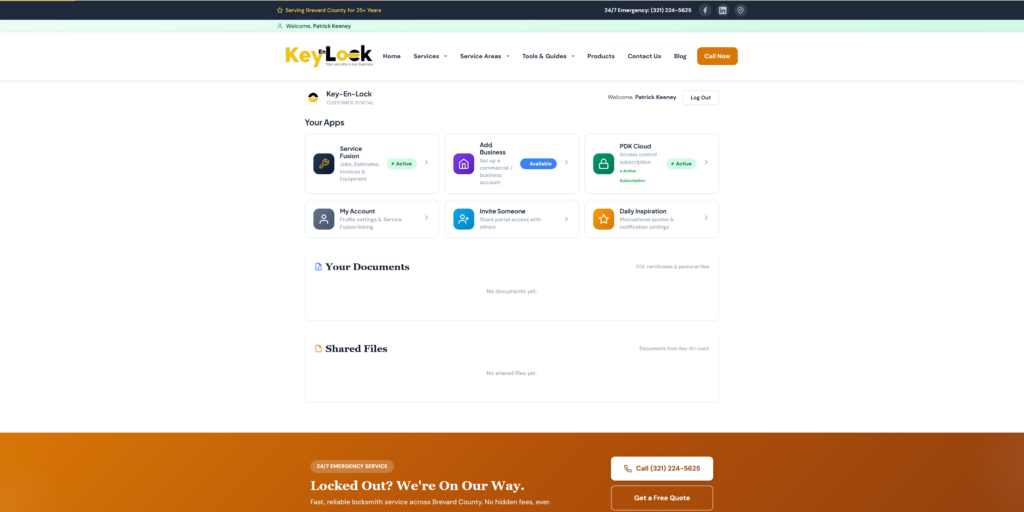
The Key-En-Lock Customer Portal is a free online dashboard where you can manage everything related to your locksmith services — invoices, job history, estimates, equipment records, access control, documents, and more. No app to download. No subscription. Just log in from any browser on your phone, tablet, or computer.
If you’ve ever called us to ask “hey, what was the total on that job last month?” or “can you send me that invoice again?” — this is the answer. It’s all right there, 24/7, without having to call anyone.
What You Can Do in the Portal
View Your Jobs and Service History
Every job we’ve done for you shows up in the portal with full details — the date, what was done, which technician handled it, and the status. Whether it was a lock rekey last week or an access control installation six months ago, it’s all there. You can search, filter, and pull up any job instantly.
For businesses managing multiple properties or locations, this is a game changer. Instead of digging through emails or calling the office, your entire service history is organized in one place.
Pay Invoices Online
No more checks in the mail. No more calling in a credit card number over the phone. When an invoice is ready, it shows up in your portal. Click it, review the details, and pay securely online with a credit card. You get a confirmation immediately, and the payment is recorded on your account.
For businesses with multiple invoices, you can see everything that’s outstanding and what’s been paid. Your bookkeeper will thank you.
View Estimates and Proposals
When we send you an estimate for upcoming work, it appears in your portal. You can review the scope, the pricing, and approve it right there without going back and forth over email. Everything stays documented and organized.
Track Your Equipment
If we’ve installed locks, access control hardware, safes, or other equipment at your property, those items are tracked in the portal. You can see what’s installed, where, and when. This is especially useful for businesses managing security hardware across multiple doors or buildings.
Manage Your PDK Access Control
If you’re a PDK Cloud access control customer, your portal connects directly to your system. You can manage credentials, view access logs, lock and unlock doors, and administer your system without needing a separate login. It’s all integrated into one dashboard.
This means you can add a new employee’s access card at 10 PM on a Sunday without waiting until Monday to call us. Your building, your schedule.
Request Service
Need a locksmith? You can submit a service request directly from the portal. Describe what you need, and it goes straight to our team. No phone tag, no waiting on hold. We’ll review it and get back to you with timing and pricing.
Upload and Access Documents
The portal has a documents section where you can upload and store files related to your account — COI certificates, signed proposals, key authorization forms, or any other paperwork. We can also share documents with you directly through the portal, so there’s no more searching your email for that PDF we sent three months ago.
Invite Others to Your Account
If you’re a business owner and need your office manager, property manager, or accountant to have access to your account, you can invite them from the portal. They get their own login and can view jobs, invoices, and documents without you having to forward everything manually.
This is built for businesses with multiple people who need visibility into the locksmith relationship — without giving everyone the same login.
Set Up a Commercial Business Account
If you’re a commercial customer and want to organize your account as a business rather than a personal account, the portal has a setup flow for that. You can link your business information, add multiple locations, and manage everything under one roof.
Daily Inspiration
This one’s a little different. We added a Daily Inspiration feature where you can opt in to receive a motivational quote every day via text, email, or both. You can even add friends and family to receive them too. It has nothing to do with locksmithing — it’s just something nice we wanted to offer our customers.
It’s Free
There’s no cost to use the portal. If you’re a Key-En-Lock customer, you have access. When we complete a job for you, you’ll get a text or email with a link to set up your account. It takes about 30 seconds — just enter your email and create a password.
If you’re an existing customer and haven’t set up your portal yet, go to keyenlock.com/customer-portal and click “Create Account.” We’ll match you to your service history automatically.
Works on Any Device
The portal is fully responsive — it works on your phone, tablet, laptop, or desktop. There’s no app to install or update. Just open your browser and log in. Bookmark it on your phone’s home screen and it works just like an app.
Secure and Private
Your data is protected with the same security standards we use for everything else. Your login is secured with optional two-factor authentication, all API credentials are encrypted, and customer data is isolated so no one can see anyone else’s account. We take this seriously because your information matters.
Built for Brevard County Businesses
Whether you’re a property manager with 50 doors, a car dealership that needs key services regularly, a small business with one storefront, or a homeowner who just wants to check on a past invoice — the portal gives you control and transparency.
We built this because we believe you should have easy access to your own service history, your invoices, and your security systems without having to call and ask. It’s your account. You should be able to see everything.
Set up your free portal account at keyenlock.com/customer-portal or call us at (321) 224-5625 if you have questions.
Serving Brevard County
Need a local locksmith? We serve nearby areas including:
- Locksmith Melbourne FL locksmith
- locksmith in Locksmith Melbourne Village
- emergency locksmith Locksmith Melbourne Beach
- locksmith in Locksmith Palm Bay
- Locksmith Malabar FL locksmith
- Locksmith Indian Harbour Beach locksmith
See all locations: Service Areas or call (321) 224-5625.